
Polynomial approximation of tabulated data using linear least-squares.
Description
This routine uses Linear Least-Squares to compute a multivariate polynomial approximation f : ℝn → ℝn1×n2 of a set of samples { yk ∈ ℝn1×n2, k ∈ [1, N] } obtained for different values { xk ∈ ℝn, k ∈ [1, N]} of some explanatory variables x ∈ ℝn. The maximum degree of the polynomial function is set by the user. No maximum admissible error can be specified and a full polynomial expression is obtained, which minimizes the global relative error and the root-mean-square error between { f(xk), k ∈ [1, N]} and {yk, k ∈ [1, N]} for each entry (see errapprox for precise definitions).
Syntax
[fdata,flfr]=lsapprox(X,Y,names,maxdeg{,options})
Input arguments
The first four input arguments are mandatory:
X | Values $\left\{x_k\in\mathbb{R}^n,k \in [1, N]\right\}$ of the explanatory variables $x$ ($n\times N$ array, where X(:,k) corresponds to $x_k$). |
Y | Samples $\left\{y_k\in\mathbb{R}^{n_1\times n_2}, k\in [1, N]\right\}$ to be approximated ($n_1\times n_2\times N$ array where Y(:,:,k) corresponds to $y_k$ in the general case, or possibly $1\times N$ array where Y(k) corresponds to $y_k$ if $n_1=n_2=1$). |
names | Names of the explanatory variables $x$ ($1\times n$ cell array of strings). |
maxdeg | Maximum degree of the approximating polynomial function $f$. |
The fifth input argument options is an optional structured variable with fields:
maxexp | Maximum exponent of each explanatory variable in the approximating polynomial function $f$ ($1\times n$ array). The default value is options.maxexp=maxdeg*ones(1,n). |
XeqYeq | Constraint to be exactly met (no least squares). options.Yeq is a $n_1\times n_2$ array and options.Xeq is a $n\times 1$ vector with associated values of the explanatory variables. The default values are options.Xeq=[] and options.Yeq=[]. |
trace | Trace of execution (0=no, 1=text, 2=text+figures). The default value is options.trace=1. |
viewpoint | This option is applicable only if 3-D graphs are to be displayed (options.trace=2 and n=2). It represents the deviation with respect to the default viewpoint (see plotapprox). The default value is options.viewpoint=[0 0]. |
Output arguments
fdata | Values $\left\{f(x_k)\in\mathbb{R}^{n_1\times n_2},k \in [1, N]\right\}$ of the approximating function $f$ (same size as Y). |
flfr | Linear fractional representation of the approximating function $f$ (GSS object if the GSS library is installed, LFR object otherwise if the LFR toolbox is installed). |
Caution
If some values in X are much larger than 1, they must be scaled or normalized.
Example
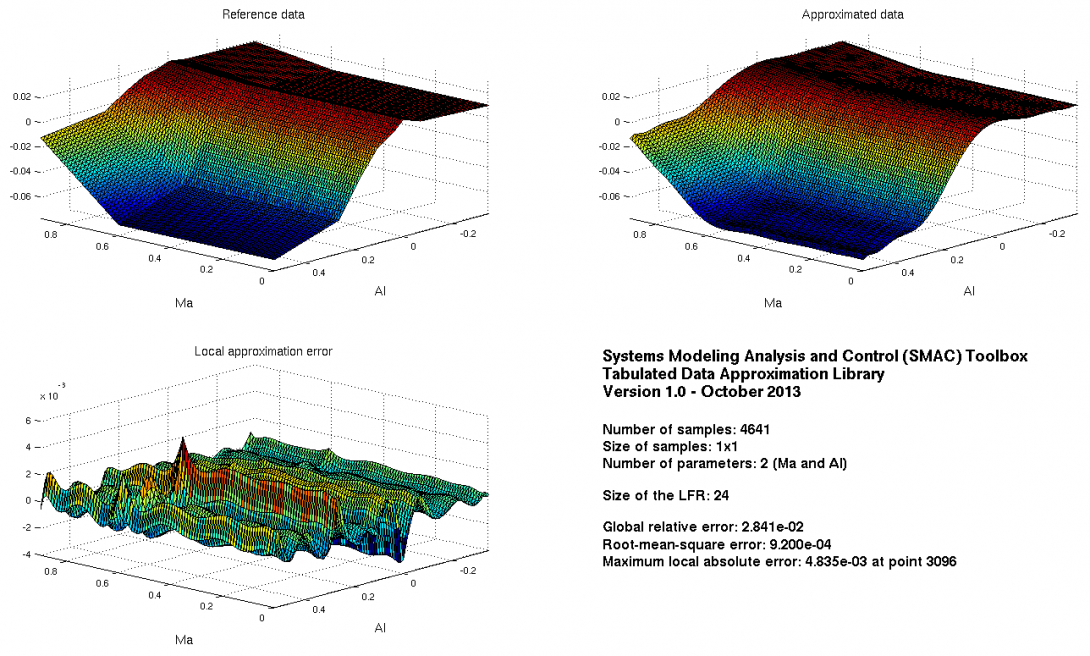
Drag coefficient of a generic fighter aircraft model:load data_cx
Approximation on a rough grid:maxdeg=12;options.trace=2;options.viewpoint=[-100 0];[fdata,flfr]=lsapprox(X1,Y1,names,maxdeg,options);
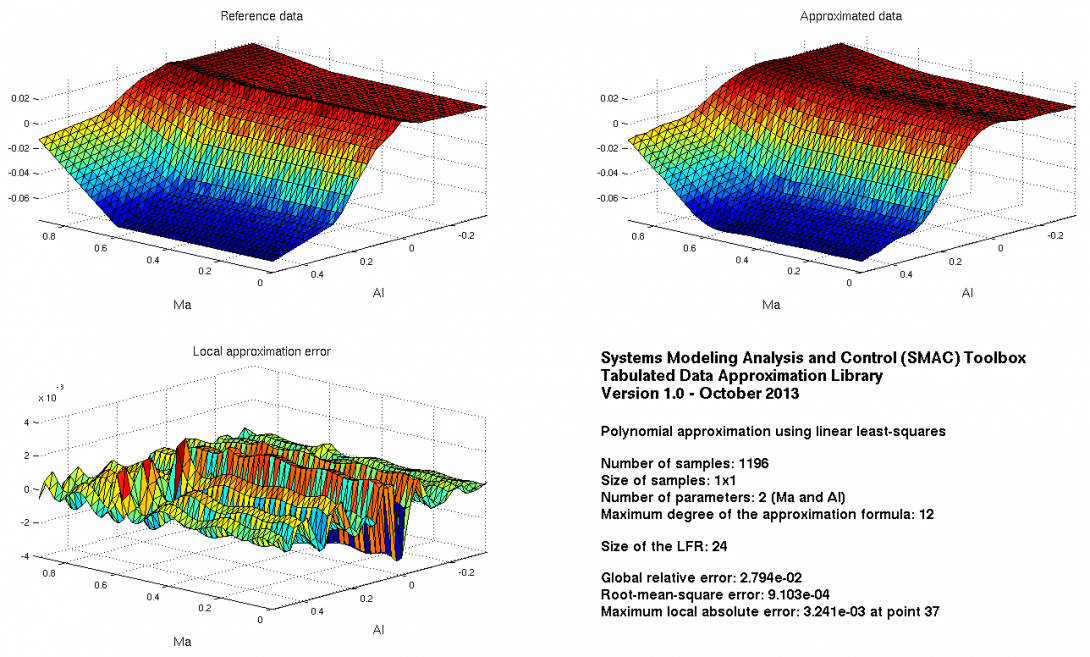
Validation on a fine grid:plotapprox(Xv,Yv,names,flfr,options);
See also
olsapproxqpapproxtrackerkoalaerrapproxplotapprox
References
| [1] | C. Poussot-Vassal and C. Roos, "Generation of a reduced-order LPV/LFT model from a set of large-scale MIMO LTI flexible aircraft models", Control Engineering Practice, vol. 20, no. 9, pp.919-930, 2012. |
| [2] | C. Roos, "Generation of LFRs for a flexible aircraft model", Optimization based clearance of flight control laws, Lecture Notes in Control and Information Sciences, vol. 416, pp. 59–77, Springer Verlag, 2011. |